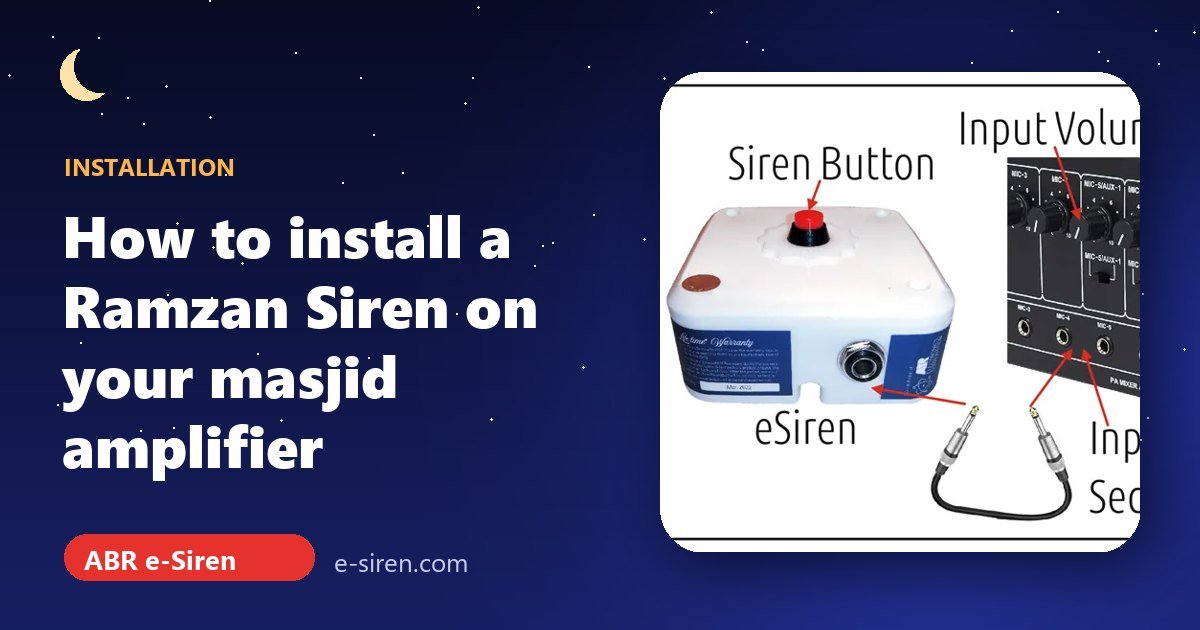
To install Ramzan Siren (the ABR e-Siren) in your masjid, connect its audio cable to a free input on your masjid amplifier, plug its power cable into a socket, keep the input volume low and press the red button to test. That is the whole job. No electrician, no wiring on the minar and no new speakers. Here is each step in detail.
What you need to install Ramzan Siren
- The ABR e-Siren unit and the audio cable that comes in the box
- Your masjid’s existing amplifier (the one used for the azan), with a free MIC or AUX input
- A power socket near the amplifier, ideally on the inverter or UPS line
Step 1: Place the unit next to the amplifier
The e-Siren is small (10 × 12 × 5 cm, about 300 g) and stays indoors. Put it on the table or rack beside your amplifier, where the person on duty can reach the red button easily.
Step 2: Connect the audio cable to the amplifier
Plug one end of the audio cable into the socket on the side of the e-Siren and the other end into a free MIC or AUX input on the amplifier. The cable uses a standard ¼-inch (6.35 mm) jack, the same type as most microphone inputs on masjid amplifiers.

Step 3: Plug in the power
Connect the power cable to a socket. The e-Siren draws under 5 watts (5V DC, 300 mA to 1 A), so it is perfectly happy on your inverter or UPS. We recommend that, because power cuts often happen around Sehri.
Step 4: Set the volume correctly
This is the one step that matters for sound quality:
- Turn the input volume knob for the e-Siren’s channel down to a low setting.
- Press the red button and slowly raise the input until the siren is clear in the horns.
- Control overall loudness with the amplifier’s master volume.
A low input level gives the best-quality siren sound and keeps your amplifier healthy for a long time. Turning the input all the way up only causes distortion.
Step 5: Test before Ramadan
Do a full test a few days before the 1st Roza: listen from the street and from a few houses away, check it again on inverter power, and show the person on Sehri and Iftar duty how to operate it. Every horn connected to the amplifier plays the siren together, so if your azan reaches the whole mohalla, the siren will too.
Good habits for a trouble-free Ramzan Siren installation
- Keep the audio cable away from power cables. Running it alongside mains wiring is the most common cause of hum.
- Leave some slack. Don’t stretch the cable tight between the unit and the amplifier, and don’t let it hang where people walk.
- Keep it dry and cool. The unit lives indoors, so keep it away from windows that let in rain and away from the amplifier’s heat vents.
- Label the input. A small “SIREN” sticker on the amplifier channel saves confusion when someone new is on duty at Sehri.
- Leave it connected after Ramadan. There is nothing to service, so it is ready for next year.
Troubleshooting
| Problem | What to check |
|---|---|
| No sound | Is the amplifier on? Is the cable in the right input and that channel’s volume up? Is the e-Siren getting power? |
| Distorted or harsh sound | Lower the input volume of the siren channel and use the master for loudness. |
| Hum or crackle | Re-seat both jack plugs firmly, or try another input on the amplifier. |
| Still not working | Call our technical team on 8500536007. We troubleshoot on the call, and faulty units are replaced under the lifetime* warranty. |
Register your e-Siren
Please register your e-Siren online right after purchase and keep the warranty card and box. You will need them for a warranty replacement at our Hyderabad service centre.
Next steps
Check Sehri and Iftar times for your city in the Ramadan Calendar 2027, and read how masjids run the Iftar and Sehri siren every day. Don’t have an e-Siren yet? It costs [esiren_price] with all-India delivery.
[esiren_buy]
Leave a Reply